
Lead Application

Capture inquiries on your website.
Land them in your CRM.

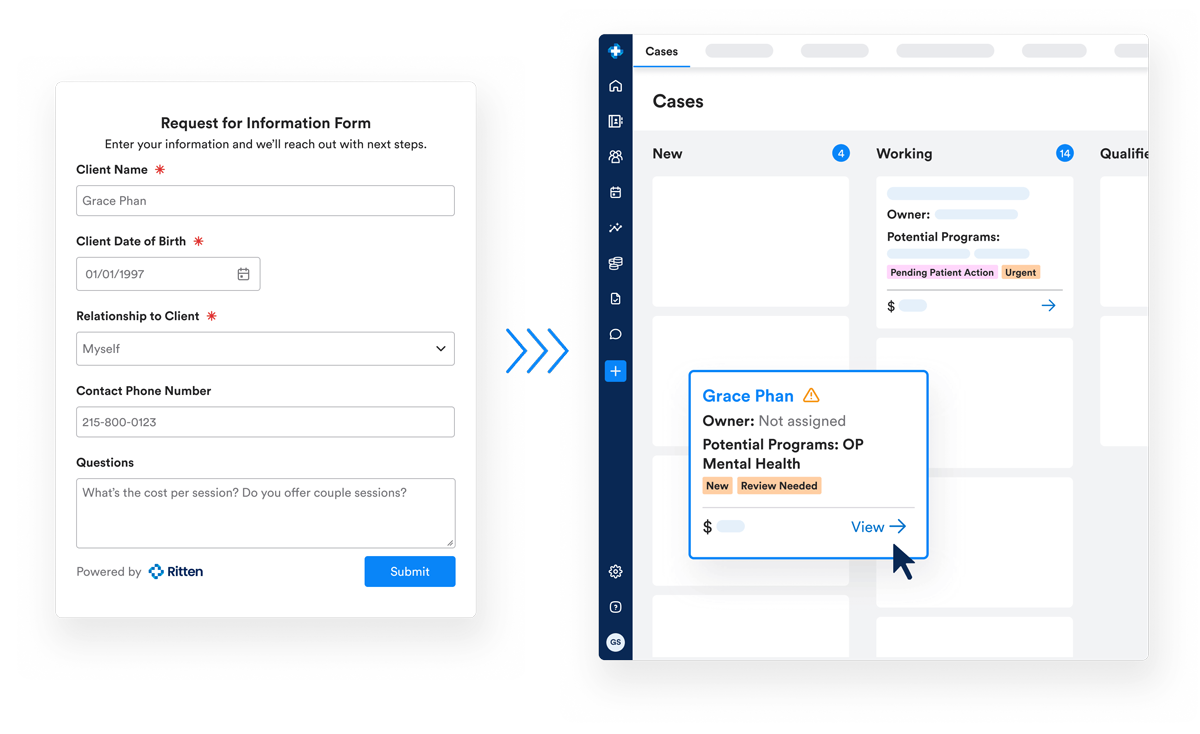
Embed the Lead Application on your site or share it by link. Submissions create cases in your Ritten CRM the moment someone hits submit demographics, payer info, and insurance card images already captured.

What is a lead application?

A first-touch intake form built for admissions. Prospective clients, family members, or referring organizations can submit on a client's behalf from anywhere. The case lands in your CRM ready to qualify no transcription, no copy-paste from email, no leads lost to a forgotten inbox.

How it works

  • Configure once. Set up the form in CRM Configurations sections, required fields, and presentation.
  • Publish and share. Use Share Lead Application to copy a link for your site or send directly. The same link can be sent from an existing case if someone called in but needs to finish entering details.
  • Submission becomes a case. A new case appears with Case Source = Lead Application and an Unconfirmed Information indicator so admissions knows to review.
  • Confirm and convert. Admissions confirms whether the person is new or already in Ritten, attaches the insurance to the right payer, and moves the case through the pipeline. Self-scheduling integration lets prospective clients book their initial consultation right away.

What the form captures

  • Client information. Name, date of birth, address, email, phone.
  • Payer information. Carrier, group #, member ID, RX BIN, start and expiration dates, plus a different-subscriber checkbox.
  • Insurance card upload. Front and back attach directly to the case.
  • Additional information. Ask anything else preferred language, reasons for seeking care, past treatment history, or any custom question your admissions process needs.

Why this changes admissions

Without a public application, every inquiry starts as a call or email someone has to read, retype, and route. The Lead Application drops the data straight into admissions, with insurance card images in the system before anyone picks up the phone.
  • Faster qualification. Insurance info and card images already attached.
  • Fewer drop-offs. Prospective clients don't wait for a call back to start the conversation.
  • Cleaner intake. Required fields prevent incomplete submissions; the Unconfirmed Information indicator ensures review before converting.
  • Source visibility. Case Source = Lead Application is set automatically, so you can filter on what came from the form.

From application to chart

When admissions moves the case to Pre-Admission, Ritten generates a client chart and MRN. Uploaded insurance cards flow into the chart's Attachments tab automatically.

Frequently Asked Questions

Still have questions about our behavioral health software? Email us at hello@ritten.io

Can we customize Claimification for each payer?

Yes. You can configure codes, modifiers, provider mappings, and fee schedules by payer, program, and level of care.

Does Claimification support Medicaid behavioral health billing?

Yes. Claimification supports detailed Medicaid rules, including state-specific codes, modifiers, and program requirements.

How does Ritten handle authorizations and utilization management requirements?

Ritten supports capturing authorization and payer requirements and can connect encounter and documentation workflows to authorization rules. This is especially important in higher levels of care where approved dates, units, and medical necessity documentation must align to avoid denials.

How does Ritten support inpatient/residential billing?

Ritten fits into the way your program already bills and automatically generates the right claims. Whether encounters create claims directly, encounters bundle into per diem claims, or per diem claims are generated from program enrollment so your workflow never has to fit an encounter-based mold.

What happens when a claim needs manual review?

Claims that fail a rule or receive a denial are flagged for review, while the rest flow through automatically to keep your team focused on the highest-value work.

What is Claimification?

Claimification is Ritten’s automated claims engine that converts behavioral health encounters into CMS-1500 and UB-04 claims using your configured billing rules.

Turn your Encounters into clean claims automatically

Show us how you bill today. We’ll show you how Claimification can reduce manual touches and speed up reimbursement.